
How to stop Google Ads scripts from repeating the same change
Use labels, checkpoints and live-value checks to make scheduled automation safe to rerun after timeouts, retries and partial failures.
Written by Touch Stone Editorial Team
Reviewed by Touch Stone Ads Technology Limited
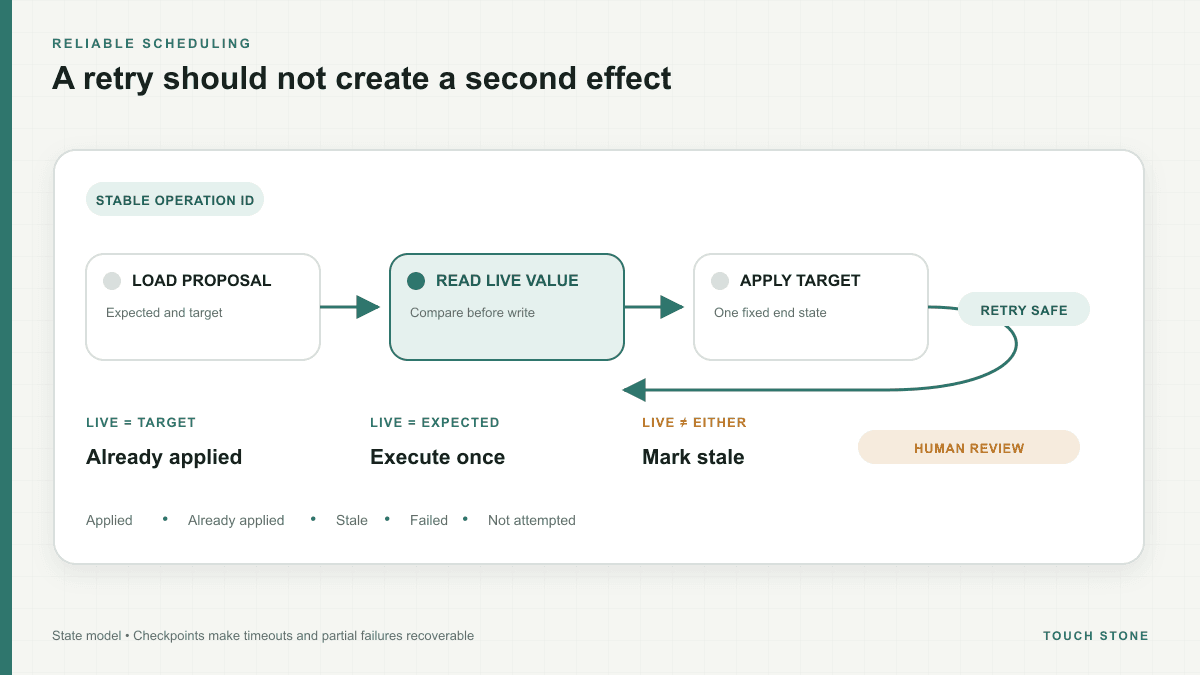
Retries are normal; duplicate effects are not
A scheduled script can time out after it has already changed some entities. Google documents that changes made before a timeout are not automatically rolled back. If the next run starts from the beginning and applies another relative increase, the same campaign can be changed twice.
Idempotency means that running the same approved operation again produces no additional effect. The workflow needs a stable operation ID and a clear definition of the intended end state, not just an instruction such as increase budget by ten percent.
Prefer final values and preconditions
Record a proposal as set campaign X from 100 to 110, with the expected current value of 100. On execution, change it only if the live value is still 100. A retry sees 110 and can safely report already applied. A manual change to 105 causes a conflict instead of an overwrite.
Relative operations are sometimes unavoidable. In those cases, store the calculated target value before approval and never recalculate it during a retry. The approved artifact should remain stable even when account data changes later.
- Give every batch and item a stable identifier.
- Store expected-before, approved-after and execution status.
- Use compare-and-set logic before each change.
- Record failures per item so the retry scope is precise.
Use labels as visible checkpoints
Google Ads labels can help a script process entities across runs, filter a working set or support a two-step review workflow. They are valuable because the state is visible inside the advertising account and can be inspected by an operator.
Do not make labels the only audit trail. Names can change and labels do not contain the full proposal context. Pair them with an external ledger that stores the operation ID, reviewer, values, reason and timestamps. A label can indicate pending review or processed; the ledger explains exactly what that means.
Checkpoint before the execution limit becomes a failure
Google Ads Scripts have execution and entity limits that can change over time. Filter selectors, request only necessary fields, process deterministic batches and checkpoint progress before the deadline. A manager-account script can also divide work with parallel execution, but each child still needs independent idempotency.
A useful completion report distinguishes applied, already applied, stale, failed and not attempted. That detail prevents a broad retry from becoming the default response to a partial failure.