
A safer workflow for Google Ads scripts: preview, approve, then execute
How to separate analysis from execution so an automation can move quickly without gaining unchecked publishing authority.
Written by Touch Stone Editorial Team
Reviewed by Touch Stone Ads Technology Limited
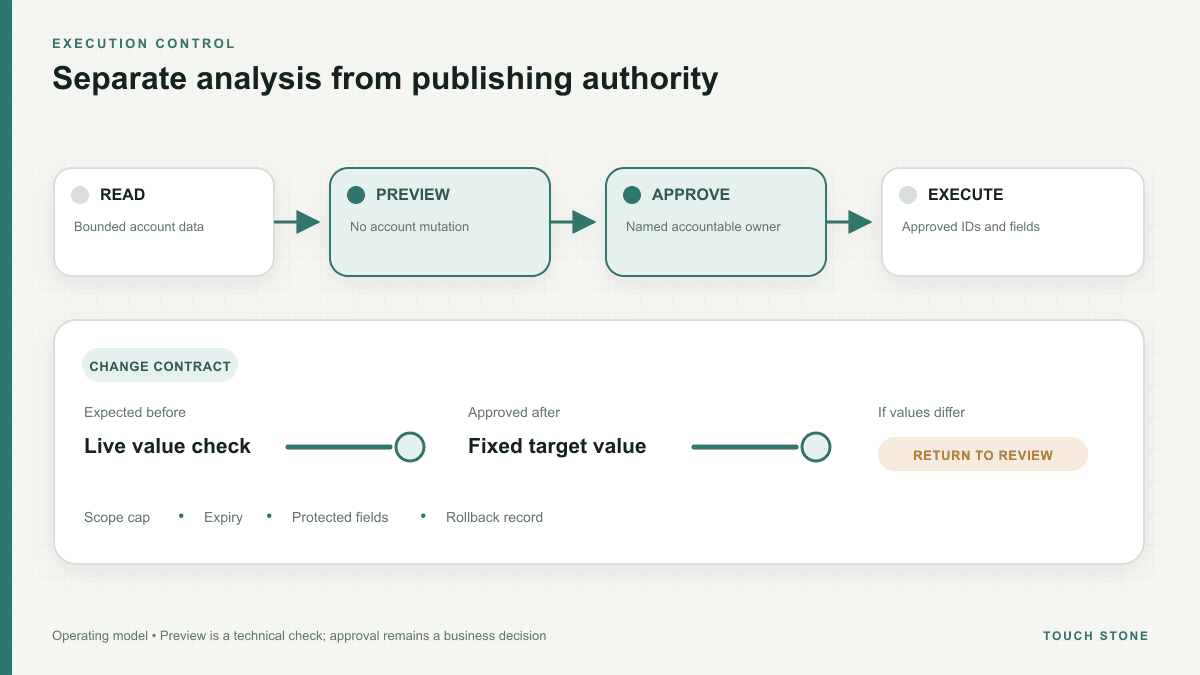
The dangerous shortcut is combining diagnosis and execution
A script that finds a problem and immediately changes the account compresses two very different jobs into one step. Detection asks whether an observation is unusual. Execution asks whether a specific intervention is commercially appropriate. The first can often be automated; the second depends on context that may live outside Google Ads, including stock, margins, sales priorities and legal approvals.
A safer design treats the script as a proposal engine. It reads a deliberately limited set of entities, produces a change set, and waits. The operator can then inspect the proposed before-and-after values, affected campaigns and reason codes before the execution credential is used.
- Read: collect only the rows and fields needed for the decision.
- Propose: create an immutable draft with entity IDs, old values, new values and reasons.
- Approve: require an accountable user for budgets, status, targeting and ad claims.
- Execute: re-check the current value, apply the approved delta and record the result.
Preview is a technical safety check, not a business approval
Google Ads Scripts preview mode lets an operator run code without making real account changes. It is ideal for checking selectors, calculations and the entities a script would touch. That makes preview a required development step, especially when a selector or date range has changed.
Preview cannot tell you whether pausing a campaign will disrupt a launch, whether a new claim is defensible or whether a budget transfer conflicts with a finance decision. Keep those questions in a separate review screen. Show the account, time zone, evaluation window and protected fields prominently so the reviewer knows exactly what is being approved.
Make the execution scope smaller than the analysis scope
An analyzer may need to compare several weeks of data across many campaigns. The resulting mutation should still be narrow: a fixed set of resource IDs, fields and maximum deltas. Do not allow the execution phase to rerun a broad selector and act on whichever entities happen to match later.
Before each mutation, compare the live value with the value recorded in the proposal. If they differ, mark the item stale and send it back for review. This optimistic concurrency check prevents an old approval from overwriting a newer manual or automated change.
- Cap the number of entities and total budget movement in one run.
- Reject proposals after a short, explicit expiry period.
- Lock fields that the workflow is never allowed to modify.
- Stop the batch when validation failures exceed a defined threshold.
Design rollback before the first production run
Rollback is not simply reversing a percentage. Store the exact prior value and enough context to determine whether reversal is still safe. If another user has changed the entity since execution, an automatic rollback can be just as destructive as the original error.
The practical standard is inspectable and reversible automation: an operator can see what happened, who approved it, which items failed and what restoration would do now. That record is also the foundation for improving the script instead of repeatedly debugging the same failure.